 +91 79 6947 8900
  +1(732) 749-7719
Executive summary on submission of Annual Safety Reports (ASR) via CTIS Application
Before going ahead with the submission of ASR in CTIS, please go through our previous blog on “New EU Clinical Trial Regulation Clinical Trials Information System (CTIS)” for the basics of CTIS
Since the introduction of CTIS, EMA is continuously publishing training modules for different industry and agency users. According to article 43 of the clinical trial regulation, the sponsor shall submit annually a report on the safety of each investigational medicinal product (IMP). In this post, one can have quick glance of process for the submission of ASRs via CTIS.
First of all it is important to know Definition and Scope of ASR
An ASR is a comprehensive annual review and evaluation of the pertinent safety information collected during the reporting period related to an active substance under investigation. Information provided in ASR, authority is able to assess the safety profile of IMP and enquire further information from Sponsor.
Let’s get started with the actual process of submission of ASR via CTIS
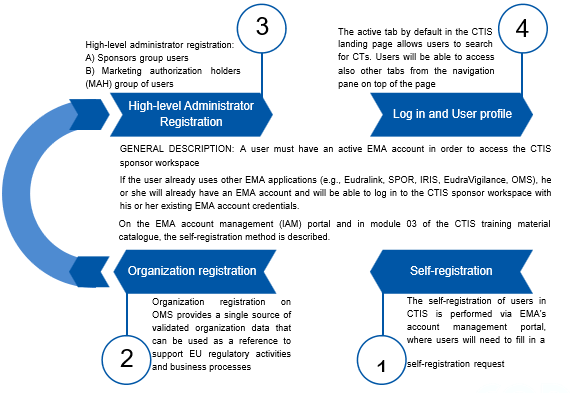
Sponsor to make sure before submission of ASR that they have access to CTIS portal and organization is registered in OMS and IMP is added in Art 57 database(xEVMPD). An infographic below gives you 4 steps involved in getting access to CTIS for an easy start.
Now, what is workspace here mean?
It is nothing but a secured area in CTIS that supports the activities of sponsors and authority users regarding the preparation, submission, assessment and oversight of clinical trials. CTIS is composed of two workspaces with secured access for sponsors and authorities and a public website openly accessible to the general public.
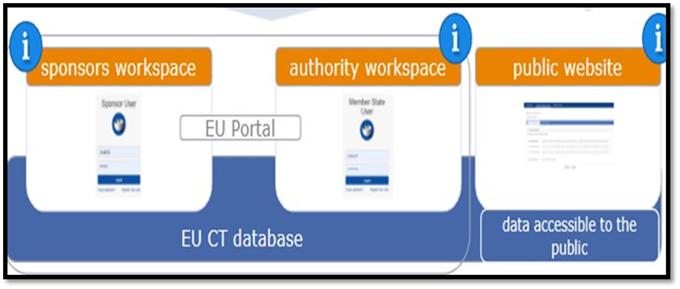
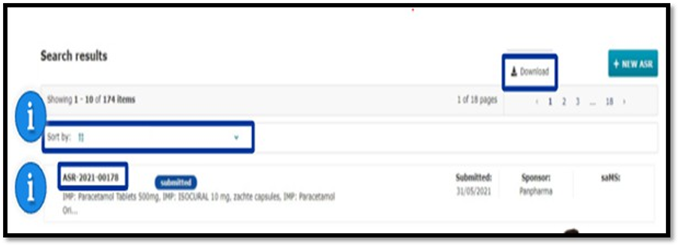
Post login to CTIS you are landed in to sponsor workspace. The steps involved in submitting an Annual Safety Report are depicted in the flow chart below for easy comprehension. EMA has published training module 18 which will provide a detailed description of each step.

Documents will be uploaded, as a part of ASR submission as mentioned in step no 04 must be either in PDF or Word formats created outside the CTIS. Users can also upload other papers in PDF formats such as SmPC, IB, and other pertinent documents in the field designated for that purpose.
Per this process there is no template obligation for the ASR document; however, one can use the ICH E2F Development Safety Update Report template endorsed by EMA to prepare the ASR if needed.
ASR submitter should take care of below-mentioned pitfalls.
- An ASR submission form cannot be saved.
- The ‘Clear’ button allows to erase the information populated on the form and start over, without closing the form.
- The ‘Cancel’ button allows to erase the information populated on the form and go back to the Annual Safety Reporting tab.
What next after submission of an ASR?
In both ASR Submission and Assessment sub-tabs of an ASR page, users can first locate the specific section and document they are looking for; and then click on the blue download icon next to each document. This action allows users to download the document in the file type and with the title, in which it was initially updated to the ASR submission form.
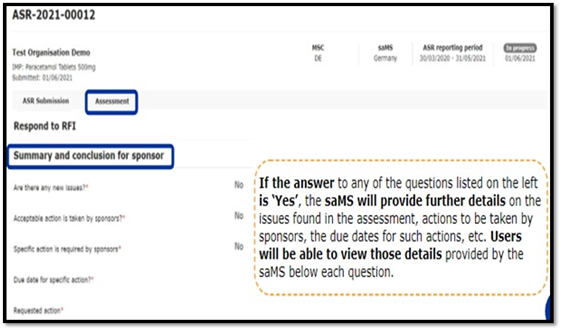
Once ASR is assessed by the lead member state, the sponsor user can see the summary and conclusion for the sponsor section of the assessment sub tab of an ASR page.
In case of receipt of additional information: Sponsor needs to submit a response to RFI as per stipulated timeline providedbythe assessor.
To check if RFI received or not user can have three different ways
Annual Safety reporting tab, Notice and alerts tab, RFI Tab. Below details must be submitted to the assessor in response to RFI.
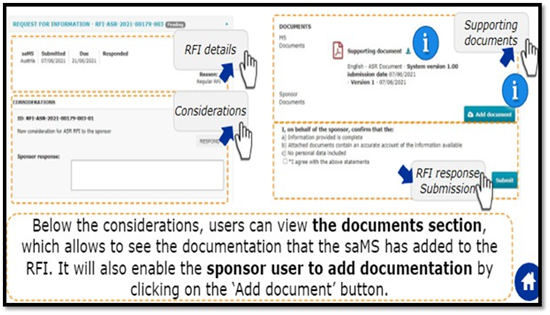
This shall surely help to understand the ASR submission, as our efforts to share developmental safety update.
COD Research's Support
We, at COD, constantly update ourselves with the recent changes related to safety/CT regulations/guidelines per our Regulatory intelligence team. Our experts can help you to support CTIS registration once it is live. We can support in setting up and guide in each Eudravigilance functions to make sure that our clients are ready for any EMA technical challenges, ensuring that there are no last moment hiccups in smooth transition from Eudra CT to CTIS. For support with Global Regulatory Solutions, do tune into our next post as a ready reckoner for further updates.
References:
www.ema.europa.eu/en/learning-module/annual-safety-report/story.html
Clinical Trials Information System (CTIS): online modular training programme